Ableton Live Quick Tip: Using Beat Repeat as a Gate
Video: Ableton Live Quick Tip - using Beat Repeat as a gate
A quick trick for turning Ableton's Beat Repeat into a gate that sequences a sound for you. In the video I use it on a lead sound.
How to do it
- Load Beat Repeat on the track with your sound (a lead in the video).
- Set the Interval to 1/16.
- Set the Grid to 1/32, with no triplets.
- Add some Variation.
- Set the mix mode to Insert.
- Turn the Volume all the way down.
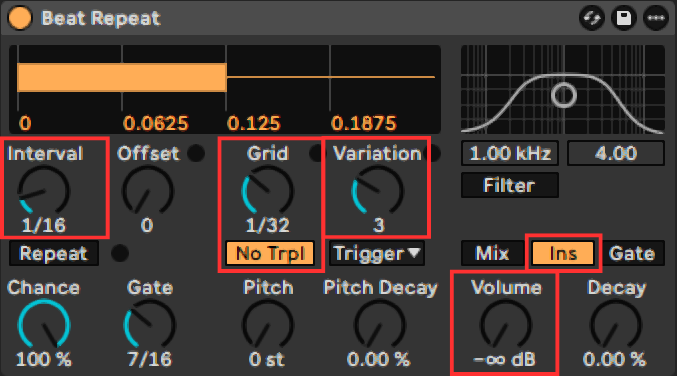
Beat Repeat configured as a gate
Now Beat Repeat gates the sound, so it sounds sequenced instead of playing continuously.
Why it works
- Insert mode mutes the original sound while Beat Repeat is active, so you only hear the repeats.
- Volume sets the level of the repeats only. With it turned fully down, the repeats are silent.
So whenever Beat Repeat fires, the sound is cut out instead of repeated. The Interval decides how often this happens, the Grid sets the length of each slice, and Variation randomizes the Grid a little so the pattern doesn't sound too predictable.
Quick tips
- Try different Interval and Grid values for different rhythms.
- Add more Variation for a less predictable pattern.
- Use it on any sustained sound, not only leads.
FAQ
good to knowHow do I use Beat Repeat as a gate in Ableton?
Set the Interval to 1/16 and the Grid to 1/32 (no triplets), add some Variation, switch to Insert mode and turn the Volume all the way down.
Why does Insert mode with the volume down gate the sound?
Insert mutes the original while Beat Repeat is active, and the Volume control only affects the repeats. With the volume down, the repeats are silent, so the sound is cut out in a rhythm.
What does Variation do in Beat Repeat?
It randomly shifts the Grid value within a range, so the pattern is less predictable.
More Guides
How to Create FM Leads Like Fungus Funk
Recreate the glassy FM sequence sound heard in Fungus Funk tracks with Albino 3. Oscillator, FM, arp, LFO and effects settings, step by step.
Read guide →How to Import Wavetables into Popular VST Synths
Step-by-step instructions for loading custom wavetables into Serum, Serum 2, Phase Plant, Pigments, and Vital, plus tips for organizing your library.
Read guide →Why You Should Save Every Sound You Make
Why saving every preset pays off, plus naming, tagging, versioning, and backup habits for building a personal sound library.
Read guide →